Wire the electronics
How to wire the two servos and the power chain to the board. The firmware drives the servos with 50 Hz PWM pulses; the board only sends the signals and never powers the servos.
Parts
| Qty | Part | Notes |
|---|---|---|
| 1 | ESP32, ESP32-S3 or ESP32-C3 dev board | Any board with USB, from about €3. USB-C is handy. |
| 2 | MG996R servos (sometimes sold as SG996R) | Standard-size metal-gear servos. Upgrade: DS3218. |
| 1 | USB-C PD charger, 30 W minimum, 45 W recommended | Must offer 20 V (USB Power Delivery). See Choosing the charger. |
| 1 | USB-C PD trigger board, set to 20 V | Asks the charger for 20 V and passes it on. |
| 1 | Buck (step-down) converter, 5 V output, 5 A or more | Turns the 20 V into the 5 V that powers the servos and the board. 8 A gives headroom. |
| 1 | Capacitor, 470–1000 µF, 10 V or more | Optional, against resets and stutter. |
| 2 | Lever connectors (Wago 221 style), 2 ports (e.g. 221-412) | The +5 V and GND rails: one port for the buck converter's output, the other for the servos' and board's wires twisted together. Bigger connectors, a terminal block or perfboard also work. |
| 2 | Servo extension cables, about 30 cm (JR/Futaba 3-pin, the standard kind) | Cut in half: two halves take the servos, one feeds the board. See Build it step by step. |
| Wire, about 0.5 mm² (AWG 20), and female Dupont connectors | The wire for the power, the Dupont ends for the board's pins. |
Tools: a soldering iron and a multimeter.
A plain 5 V power supply of 3 A or more also works instead of the charger, trigger board and buck converter: connect it straight to the +5 V and GND rails.
Example parts
These are the parts the reference build uses. Listings change over time and any equivalent part works. The links are examples, not sponsored or affiliate links.
| Part | Example listings (AliExpress) | What to look for |
|---|---|---|
| MG996R servo (sometimes sold as SG996R) | Example | Standard size, metal gears, 180°. |
| DS3218 servo (upgrade) | Example | The 180° version, metal gears, 20 kg·cm class. See Stronger servos. |
| USB-C PD trigger board | Example 1, example 2 | USB-C input, PD3.0/PD3.1 (QC3.0 is a bonus), selectable output from 5 to 48 V, 5 A. |
| Buck converter | 8 A, 5 A | Input up to 25 V, output selectable or adjustable (3.3/5/9/12 V), set to 5 V. |
Stronger servos: DS3218
The DS3218 costs more than the MG996R but is much sturdier and has much more torque (20 kg·cm class, metal gears). It has the same standard servo size, so it should fit the same mounts (not checked on the Mk3 yet).
- Pick the 180° version. The DS3218 also comes as 270°, which would map the angles wrong.
- Its pulse range is about 500–2500 µs: set it in Settings → Hardware → Wiring, then run Calibration again. See Servo pulse range.
- It draws more current when it stalls, up to about 2.5–3 A each. With two DS3218, use the 8 A buck converter and a 45 W charger.
Supported boards
Any ESP32, ESP32-S3 or ESP32-C3 development board. ESP8266 boards are not supported (ADR 0008).
Default pins
| Chip | Horizontal servo | Vertical servo |
|---|---|---|
| ESP32 | GPIO 18 | GPIO 19 |
| ESP32-S3 | GPIO 4 | GPIO 5 |
| ESP32-C3 | GPIO 4 | GPIO 5 |
On the S3 and C3, GPIO 18 and 19 carry USB, so the defaults differ. To wire differently, choose the pins in Settings → Hardware → Wiring; the robot restarts to apply them. The list only offers pins that are safe on your chip.
Power
The robot runs from a USB-C charger, through two small boards:
- USB-C charger → PD trigger board, over a USB-C cable. The trigger board asks the charger for 20 V.
- PD trigger board → buck converter: the 20 V goes into the buck converter's input.
- Buck converter → +5 V and GND rails: its 5 V output feeds the two servos and the board.
Set both boards before you connect the servos or the board:
- Set the trigger board to 20 V (with its solder pad, jumper or button, as its listing explains), plug it into the charger and check its output with a multimeter: about 20 V.
- Connect the buck converter, set its output to 5 V, and check it with the multimeter: about 5 V.
- Only then connect the buck converter's output to the +5 V and GND rails.
Never select a trigger voltage above the buck converter's maximum input. The example buck converters accept up to 25 V: 20 V is the right pick, and 28 V or more would destroy them.
Choosing the charger
Take a good USB-C PD charger that offers 20 V: 30 W minimum, 45 W much better. Two MG996R can each draw over 1 A when they stall, and the two boards lose a little power converting it. 30 W covers that; 45 W leaves headroom so the charger doesn't cut out when both servos start together.
Wiring
The buck converter's 5 V output feeds the two servos and the board.
Each MG996R has three wires: orange (signal), red (+5 V) and brown (ground).
| Wire | Connect to |
|---|---|
| Servo red | +5 V |
| Servo brown | GND |
| Horizontal servo orange | GPIO 18 (S3/C3: GPIO 4) |
| Vertical servo orange | GPIO 19 (S3/C3: GPIO 5) |
| Board 5V / VIN pin | +5 V |
| Board GND pin | GND |
Use a small terminal block, a Wago-style connector or a perfboard as the +5 V and GND "rails" that everything plugs into.
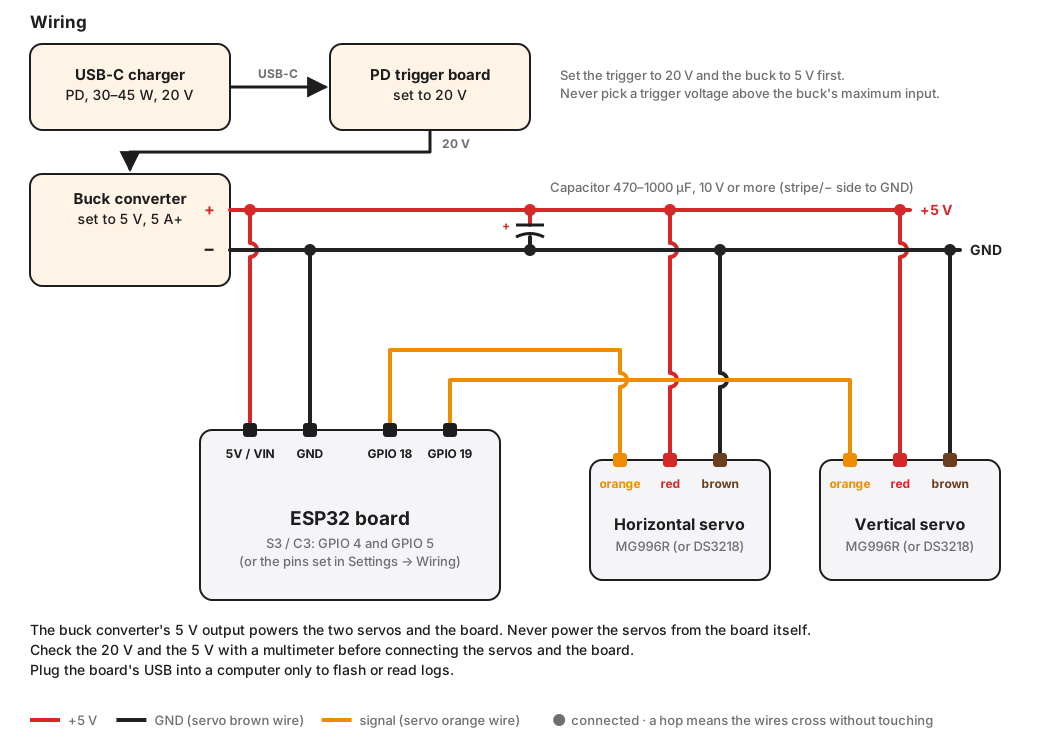
- The buck converter's 5 V output powers everything; the board takes its power from its 5V/VIN pin.
- Plug the board's USB into a computer only to flash or read logs. Most dev boards have a diode that keeps the external 5 V from flowing back into the computer, but not all: if you're not sure about yours, unplug the USB-C charger first.
Rules
- Common ground. The board's GND must be connected to the buck converter's output −, or the servos will jitter or ignore the signal.
- Never power the servos from the board. Not from its 3.3 V pin, and not from its 5 V pin when it runs on USB. An MG996R can draw over 1 A when it stalls.
- Size the power. Allow 5 A or more at 5 V for two MG996R: a buck converter of 5 A or more, a charger of 30 W or more (or a plain 5 V supply of 3 A or more). Weak power resets the board when both servos start together, often seen as the robot rebooting when the wand moves.
- Thick power wires. Keep the 5 V and ground wires to the servos short and reasonably thick.
- Capacitor. If the board resets or motion stutters, add a capacitor (470–1000 µF, 10 V or more) across the +5 V and GND rails, close to the servos.
Build it step by step
Photos coming soon. They will show the wiring laid out on the table, for a first test.
This is how the reference build is wired, with lever connectors (Wago 221 style) as the rails and cut servo extension cables. It needs a little soldering. Any other build can follow the Wiring table and diagram above instead: they apply to every build. Wire it on the table and test it first; fitting it into the Mechanism will be covered later.
Keep the charger unplugged unless a step says otherwise.
- Trigger board output. Solder two wires to the USB-C PD trigger board's output, + and −.
- Buck converter input. Solder those two wires to the buck converter's IN pins: + to +, − to −.
- Buck converter output. Solder two wires to the buck converter's OUT pins, + and −.
- Set and check the voltages. Set the trigger board to 20 V and the buck converter's output to 5 V, and check both with a multimeter before you connect anything else, as in Power. Then unplug the charger.
- Cut the extension cables. Cut two servo extension cables in half. Keep the two halves whose plug a servo plugs into, and one of the other halves: its plug is like the servo's own and fits onto the board's pins.
- Remove one signal wire. On that board-side half, pull out or cut off the signal (orange) wire. This half only carries +5 V and GND to the board.
- Gather the rails. Strip the three red wires (the three halves), twist them together and put them in one port of a lever connector; the buck converter's OUT + goes in its other port. Do the same with the three brown wires and the buck converter's OUT − in the second connector. Not the neatest, but it holds.
- Power the board. Plug the board-side half onto the board's 5V/VIN and GND pins: red on 5V/VIN, brown on GND. Check your board's pinout first. If 5V/VIN and GND aren't next to each other, use two separate female Dupont wires instead. Never put the red wire on the 3.3 V pin.
- Horizontal servo. Plug the Horizontal servo into one of the servo-side halves.
- Vertical servo. Plug the Vertical servo into the other servo-side half.
-
Signal wires. Each servo-side half still has its signal (orange) wire: it continues the servo's orange wire to the board. Put a female Dupont end on each one and push it onto its GPIO pin:
- the Horizontal servo's half to GPIO 18 (S3/C3: GPIO 4);
- the Vertical servo's half to GPIO 19 (S3/C3: GPIO 5).
If you used other pins, choose them in Settings → Hardware → Wiring.
Servo pulse range
The defaults come from the proof of concept: 400–2200 µs for the Horizontal servo and 600–2400 µs for the Vertical one, mapped to 0°–180°. If your servos don't reach their full travel, or buzz at an end, adjust the pulse range in Settings → Hardware → Wiring. The same section reverses an axis whose direction is mirrored. Either change resets Calibration, so run it again afterwards.
Next: Install the software.