English · Français
An open-hardware robot that plays with your cat. An ESP32 swings a toy wand on two servos. You drive it from your phone through a web page served by the robot itself, with no app, no cloud and no account. Home Assistant is optional.
Everything is free and open: the printable parts, the firmware and the docs.





Status: V1 stable. v0.1.0, the first stable release, passed the full acceptance checklist on a classic ESP32. The ESP32-S3 and ESP32-C3 builds are tested automatically, not yet on real hardware.
What it is
- Play from your phone. A joystick and a speed slider in any browser on your Wi-Fi, with no app to install.
- Play sessions. Pick a duration and tap Start: the wand plays with your cat on its own, within your limits, then Stows.
- Safe by design. Travel limits it never exceeds, a Stow button nothing can interrupt, smooth motion, and a stop as soon as your phone disconnects.
- Easy to set up. Install from the browser, enter your Wi-Fi (or skip it and use the robot's hotspot), and let the Calibration wizard fit the robot to your build.
- Yours to adapt. Your pins and servos, your robot's name, English or French, an optional PIN, and updates over Wi-Fi.
- Home Assistant if you want it, through its Native integration or MQTT, and an open API for everything else.
Specs: every feature in detail · V1 spec · Support spec · planned for later · design decisions · glossary
See it
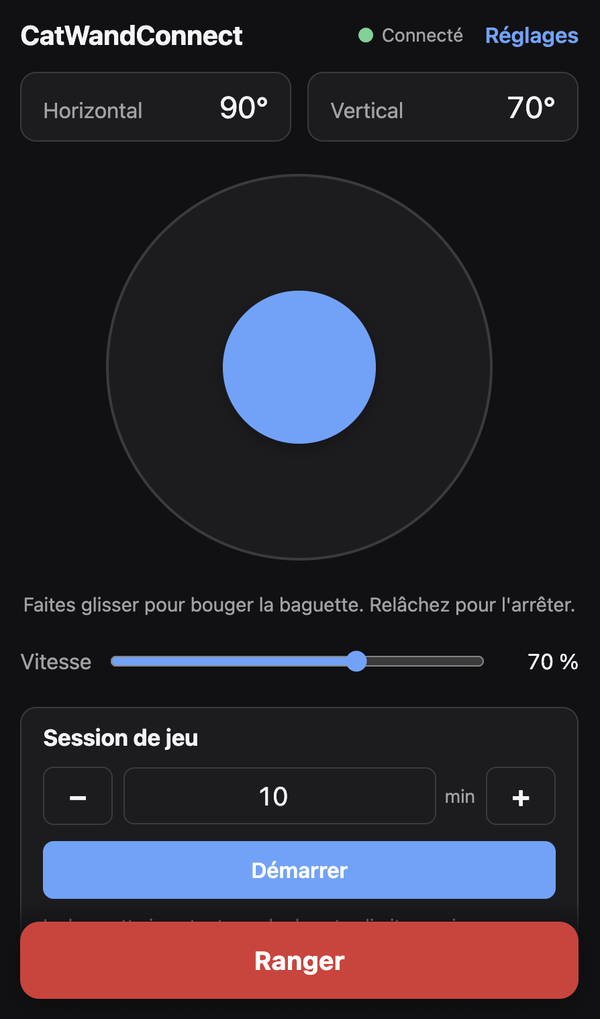 The Device interface on a phone |
The Mk2 in 50 seconds: print it, assemble it, add your cat's favourite toy, play.
Photos of the real robot are coming.
Build your own
Three parts: install the firmware, wire the electronics, print and assemble the Mechanism. Any order works; the firmware can go on a bare board first.
1. Firmware
The firmware installs from your browser, with nothing to download: open the web flasher in Chrome or Edge, plug the board in over USB and press Connect and install. The right build for your chip is picked for you. Later updates go over Wi-Fi, from the robot's own Settings page.
Open the web flasher → · Install the software · What's new · Release channels
2. Electronics
A USB-C charger powers everything: a PD trigger board asks it for 20 V, a buck converter turns that into 5 V, and the 5 V feeds both servos and the board; the board only sends the servo signals. The power boards need a little soldering. The wiring guide walks through it step by step and lists example parts.
| Qty | Part |
|---|---|
| 1 | ESP32, ESP32-S3 or ESP32-C3 dev board (not ESP8266, see ADR 0008) |
| 2 | MG996R servos (sometimes sold as SG996R), or DS3218 for more torque |
| 1 | USB-C PD charger, 30 W minimum, 45 W recommended (must offer 20 V) |
| 1 | USB-C PD trigger board, set to 20 V |
| 1 | Buck converter, 5 V output, 5 A or more |
| 2 | Lever connectors (Wago 221 style), 2 ports |
| 2 | Servo extension cables, about 30 cm |
| Wire, Dupont connectors, an optional 470–1000 µF capacitor; a soldering iron and a multimeter |
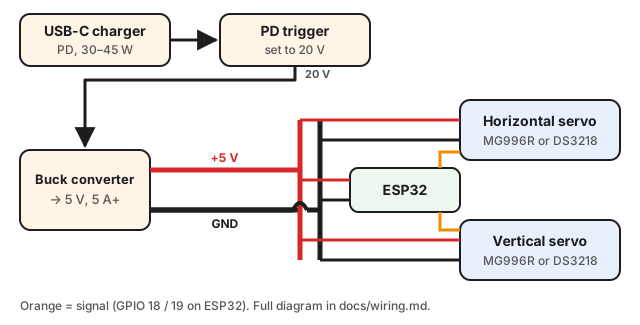
Wiring guide →: full diagram, example parts, pins per chip, power rules.
3. Hardware
The Mechanism, the Mk3, is 3D printed: seven parts, all in stls/mk3/ or as one .3mf plate. It is standalone: the electronics fit inside, behind a printed door, and a single USB-C connector powers it. No printer? Any print service or maker space can print them. Add a skateboard bearing, 6 mm balls (airsoft BBs), a few M3 screws and a toy wand.
| Qty | Part |
|---|---|
| 7 | Printed parts (arm, bearing holder, clamp, door, screw, rotor plate, top plate) |
| 1 | 608 skateboard bearing |
| 27–28 | 6 mm balls (airsoft BBs work very well) |
| 15 | M3 screws, 8 to 30 mm |
| 1 | Toy wand |
Print the parts → · Assemble the Mechanism → (photos coming soon)
Documentation
Build and use
| Doc | For |
|---|---|
| 1. Print the parts | The seven printed parts of the Mk3 and print settings |
| 2. Assemble the Mechanism | Parts to buy (bearing, balls, screws) and assembly order (photos coming soon) |
| 3. Wire the electronics | Board, servos, USB-C power chain, wiring diagram, default pins per chip |
| 4. Install the software | Flashing from the browser, Wi-Fi, Calibration, updates |
| 5. Set up Home Assistant | Optional: two ways to connect, the Native integration (HACS) or the MQTT connection, a dashboard for each, automations |
| Features | Everything the robot does, in detail |
| Troubleshooting | Installing, Wi-Fi, motion, updates, PIN |
Develop and contribute
| Doc | For |
|---|---|
| Getting started | Tools, building, tests, the simulator and the code layout |
| Device API | HTTP, WebSocket and MQTT API, for scripts and integrations |
| Acceptance checklist | What to check on the real robot before each release |
| Releasing | Release channels, publishing a version and the web flasher |
| Glossary · Decisions | The project's words, and why things are the way they are |
| Media | Logo, banners, photos and screenshots, and how to add them |
| Discord server | How the community server is organised, for maintainers |
| AGENTS.md | Instructions for AI coding agents |
Get help
- Questions, build help, show your robot: the CatWandConnect Discord. No GitHub account needed; English, French and other languages welcome.
- Found a bug? Open an issue, or post it in
#supporton Discord. - Security problem? Report it privately, never in public.
CatWandConnect is maintained in spare time, with no guaranteed response time. See Getting help for what to include.
Contributing and support
Issues and pull requests are welcome: start with Getting started. The interface can be worked on without hardware, thanks to the simulator in firmware/tools/dev_server.mjs.
CatWandConnect is free. If your cat enjoys it, you can support it through GitHub Sponsors. Ready-to-assemble kits may follow later.
Licence
| Firmware | GPL-3.0-or-later |
| Hardware designs | CERN-OHL-S-2.0 |
| Documentation | CC BY-SA 4.0 |
You may build, modify and sell your own version. See LICENSE.md. The name "CatWandConnect" is reserved for the official project and kits; see the trademark policy.